Google September 2026 Spam Update: What Businesses Need to Know
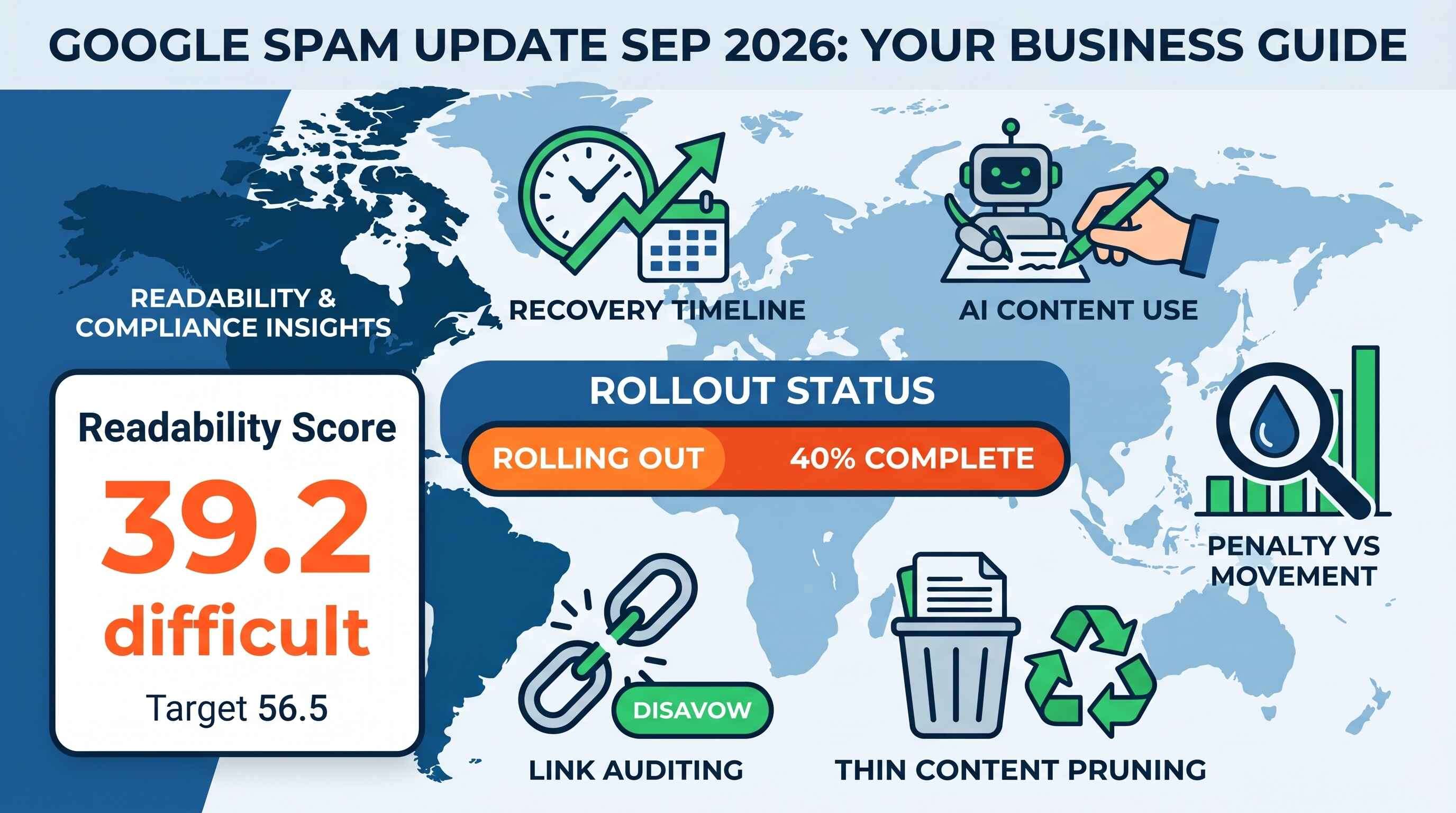
Google began rolling out its September 2026 spam update on September 24, 2026. If you run a business website, an online shop, or a niche blog, updates like this can make your heart drop. One morning your sales calls are ringing off the hook, and the next day your traffic chart looks like a ski slope.
This is Google's fourth major spam update of 2026. The search team ran similar updates in March, June, and August. But this September release has one big difference: it is scheduled to take up to two full weeks to complete. The earlier rollouts this year wrapped up in just a couple of days.
Let's cut through the scary jargon. Here is a clear, no-nonsense look at what Google changed, what they are targeting, how to check your site, and how to protect your income.
What Is the Google September 2026 Spam Update?
Think of Google as a giant library and its search engine as a very strict librarian. Every day, millions of people walk in and ask questions. The librarian's only job is to hand them the best, most truthful book on the shelf.
Over time, people figure out ways to sneak fake or junk books onto the front tables. They do this to make money off clicks or ads.
A spam update is when the librarian walks through the aisles with a big trash bin. Google updates its automated filters to spot bad pages, throw them off the front tables, and push them down where nobody can see them.
Quick Facts at a Glance
- Start Date: September 24, 2026.
- Rollout Time: Up to 14 days (running into early October).
- Target: Websites that violate Google Search Essentials.
- Reach: Global. It affects all countries and all languages.
- Penalty Type: Mostly automated algorithmic demotions, not manual human flags.
Why Is This Rollout Taking Two Weeks?
Earlier updates this year were quick sweeps. A two-week rollout usually means Google is running deeper, multi-layered system checks across its global servers.
Because the rollout takes two weeks, you might see your rankings jump up and down like a yo-yo. A page that drops on Monday might bounce back by Friday, or sink lower next week. That is why you should never hit the panic button while an update is still underway.
What Google Is Actually Hunting Down
Google has a rulebook with over a dozen spam categories. But you do not need to memorize all of them. In this update, the search engine is laser-focused on four major bad habits:
1. Mass-Produced AI Articles (Scaled Content)
Artificial intelligence tools make writing fast and cheap. You can type a single prompt and get twenty articles in five minutes. Because it is so easy, many site owners started posting hundreds of AI-generated articles every single week.
Here is the problem: most of that content is just recycled internet porridge. It restates the same five points everyone else made, but in different words. It adds no fresh research, no personal experience, and no real photos.
Google does not hate AI tools. Google hates lazy content at scale. If your website puts up hundreds of cookie-cutter posts just to rank for search terms, Google's systems will mark that as spam.
2. Parasite SEO (Site Reputation Abuse)
Have you ever searched for "best credit cards" or "best diet pills" and seen an article posted on a famous college website or a local city newspaper?
That is called parasite SEO. Shady marketers pay big, trusted media sites thousands of dollars to post their reviews. The marketer hopes that Google will rank the page purely because the newspaper has a great reputation.
Google calls this site reputation abuse. If a trusted website lets third parties post low-quality affiliate reviews without strict editorial review, Google is now stripping the ranking power from those pages.
3. Repurposed Expired Domains
Every day, old websites expire. A family-owned plumbing business in Ohio closes down, and its website domain goes up for sale. Because that plumbing website was online for fifteen years, it already has good links and search history.
Some webmasters buy these old domains and turn them into casinos, crypto blogs, or cheap review sites overnight.
Google treats this as trickery. If you buy a dead domain just to ride on its past reputation, Google's spam systems will wipe away its old ranking power.
4. Shady Link Schemes
Links still matter in search. When another website links to your page, it acts like a vote of confidence.
Because links matter, people try to buy them. If your inbox is full of messages from people offering "50 high-authority backlinks for $100," those are link schemes. Google's machine learning systems spot unnatural link patterns easily. If a site relies on purchased links, link exchanges, or spam comments on forums, those links will lose their value fast.
Spam Updates vs. Core Updates (Keep Them Straight)
It is easy to get these two types of updates confused. But they work very differently:
| Feature | Spam Updates | Core Updates |
| Main Goal | Catch rule-breakers and spam tactics | Re-score overall quality and relevance |
| What Gets Hit | Sites using cheats, scraped text, or paid links | Good sites that may just need fresher content |
| How to Fix | Remove the bad practice or clean up the site | Improve your content depth and match user needs |
| Recovery Speed | Often takes months until the next spam sweep | Gradual, as Google recrawls your pages |
If your site drops during a spam update, you need to look in the mirror. Ask yourself: did we take shortcuts? Did we buy cheap links? Did we blast out fifty auto-generated articles last month?
If your site drops during a core update, you might not have done anything wrong at all. A competitor may simply have written a better, more helpful guide than yours.
Did Your Website Get Hit? Here Is How to Check
Do not rely on gut feelings or random third-party tools. Use your real data.
Step 1: Look at Google Search Console
Log in to your free Google Search Console dashboard and click on Performance.
- Change the date filter to compare the last 7 to 14 days against the same period before September 24.
- Look at your total clicks and total impressions.
- Did your line drop off a cliff right around September 24 or 25? If it dropped by 40% or more overnight, your site likely tripped a spam filter.
Step 2: Check for a Manual Penalty
In the left sidebar of Search Console, scroll down to Security & Manual Actions and click Manual actions.
- Green check mark ("No issues detected"): You are clear of human penalties. Any drop you see is algorithmic (run by software).
- Red alert: A human reviewer at Google looked at your site and manually flagged it. The screen will tell you the exact issue (such as "Unnatural links" or "Spammy structured markup") and provide a button to request a review after you fix it.
Step 3: Spot the Patterns
Look at the Pages tab in Search Console. Did your whole site drop, or did only one folder lose traffic?
If your core service pages and homepage are doing fine, but your automated blog lost all its clicks, your problem is isolated. That makes fixing it much simpler.
How to Clean Up Your Website and Stay Safe
You do not need a computer science degree to build a safe, profitable website. You just need to follow common sense and put your reader first.
Write Like a Human Helping Another Human
When you sit down to write a blog post, picture a real customer sitting across the kitchen table from you.
- Answer their main question in the first two paragraphs.
- Use simple, friendly words. Skip big corporate buzzwords that mean nothing.
- Keep your paragraphs short. Two to three sentences per paragraph makes your content easy to read on a mobile phone screen.
Audit Your Existing Content
Take an honest look at the articles you published over the past year.
- Delete the junk: If you have short, 300-word articles that get zero traffic and offer zero value, delete them or set them to
noindex. - Merge thin posts: If you have four weak articles about the same topic, combine them into one strong, complete guide.
- Add original proof: Include your own photos, real client stories, price quotes, and practical lessons you learned on the job. An AI bot cannot take a real picture of your team working or share a story about a mistake you fixed for a client. That real experience is what Google rewards.
Clean Up Your Backlinks
If you hired a cheap SEO company two years ago that built thousands of spammy links to your site, take action.
- Download your backlink list from Google Search Console.
- Look for weird foreign-language directories, adult sites, or forum signature links.
- If you see obvious link spam pointing at your domain, build a simple text file and submit it through Google's Disavow Links Tool. This tells Google: "I did not ask for these links, please ignore them."
Fix Slow and Annoying User Experiences
Spam is not just about words; it is also about how you treat your visitors.
- Make sure your site loads in under three seconds on a phone.
- Remove pop-up banners that cover the whole screen the second someone lands on your page.
- Make your text easy to read with high contrast (dark text on a clean, light background).
Frequently Asked Questions (FAQ)
How long does Google take to restore rankings after a spam update?
Recovery is rarely instant. If your site was caught by an automated spam filter, you must first fix the root issues on your site. After you clean up your content or disavow bad links, Google has to recrawl your pages. In most cases, you will not see major rank recoveries until the next time Google refreshes its spam systems, which can take several months.
Can AI-written content rank safely on Google?
Yes, but only if a human guides, fact-checks, and improves it. Google has stated clearly that it does not penalize content just because it was made with AI. Google penalizes content that has no value, makes false claims, or is mass-produced solely to manipulate rankings. If you use AI to brainstorm or draft, make sure a real person edits the post, checks facts, and adds unique insight before you hit publish.
How do I know if my drop is a penalty or just normal rank movement?
Normal day-to-day rank movement usually causes small traffic shifts of 5% to 10%. A spam hit is much sharper. If your impressions and clicks plunge by 40% to 80% within 48 hours of an update launch, that points to an algorithmic filter or penalty. Always check your Search Console graph to see if the drop matches the update date.
Should I delete all my low-traffic blog posts?
No, do not delete pages blindly. A page might get low search traffic but still be very helpful to your existing buyers, like a user manual or a company policy page. Only delete or rewrite pages that are low quality, duplicate other pages, or were made solely to trick search engines.
Do I need to buy expensive SEO tools to fix this?
No. While paid SEO tools can save time, you do not need them to recover. Google Search Console is 100% free and gives you direct data straight from Google. It shows you your real queries, click numbers, broken pages, and security alerts. Focus on your real customer questions and your Search Console data first.
Will disavowing backlinks hurt my rankings?
Only use the disavow tool if you know your site has a large number of unnatural, spammy, or paid links pointing to it. If you disavow natural links that were actually helping your site rank, your traffic can drop further. If you are unsure, focus on making your on-page content better before touching your link profile.
What to Do Next
If you run a good business and treat your website visitors with respect, you do not need to dread Google updates.
Take a breath, wait for the September rollout to finish, and look at your Search Console numbers. If your traffic stayed steady or went up, keep doing what you are doing. If your traffic slipped, use it as a wake-up call to trim the fat, remove cheap shortcuts, and build a site your customers love coming back to.
Subscription Subscribe to our newsletter and receive a selection of cool articles every weeks
We Bring You the
Digital Solutions You Need
Let’s build something bold, brilliant, and uniquely yours. Whether you need a website, an app, or an entire brand ecosystem, we’re ready to make it happen.
request a quote Let's Chat
Feel free to contact us.